Status: works as a local app and was deployed on Vercel with Supabase sync; code last changed in May 2026, and the base Supabase schema is not in the repo yet · Visibility: public · Last updated: 2026-10-04
Contents
- Screenshots
- Features
- Requirements
- Install
- Run / Use
- Configuration
- How it works
- Project layout
- Development
- Coming soon
- Recent changes
- Related repositories
- Credits and license
Screenshots
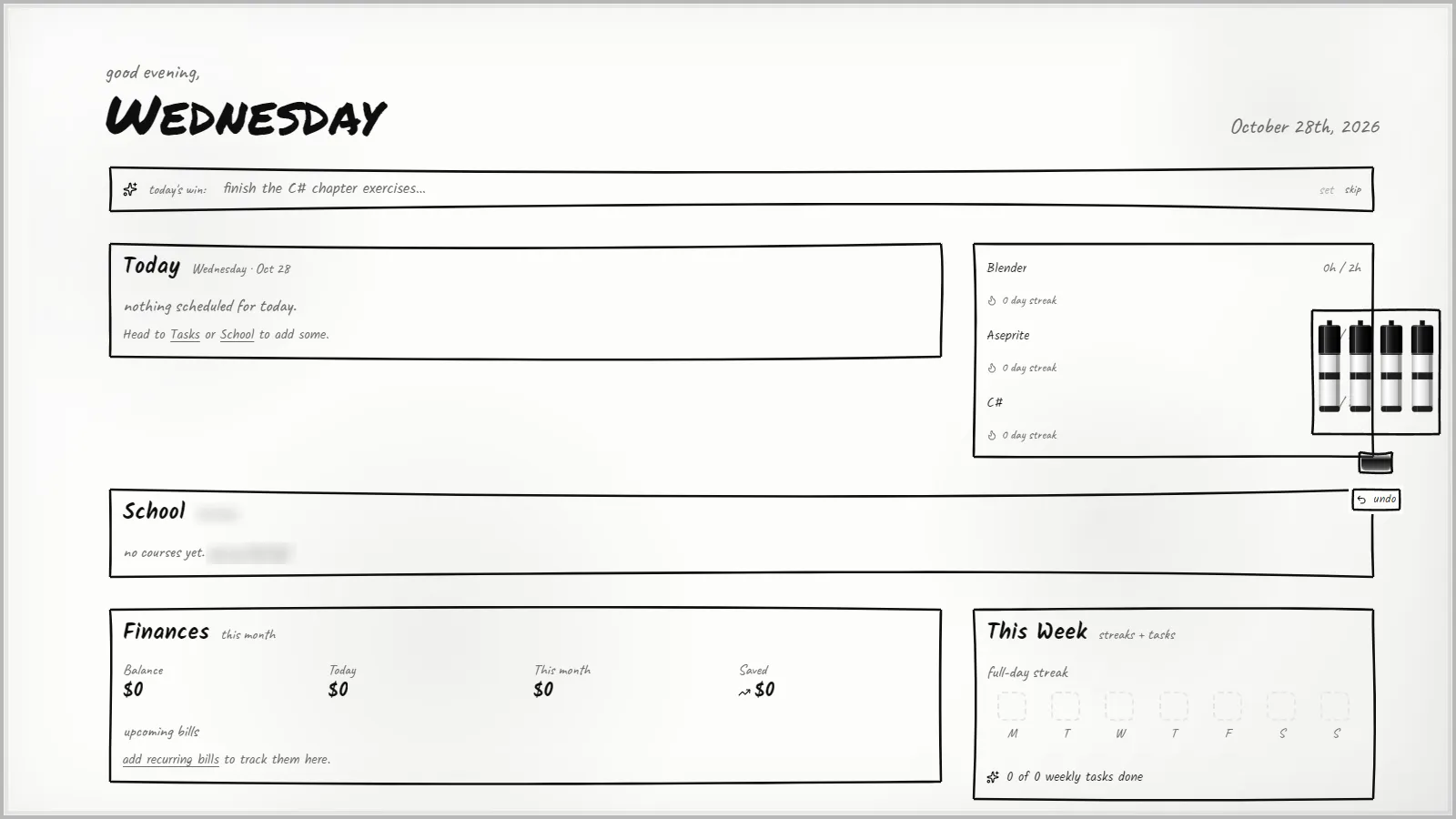
The board, the first screen every day: one win for today, what is scheduled, practice timers with streaks, school, money this month and the week’s streak.
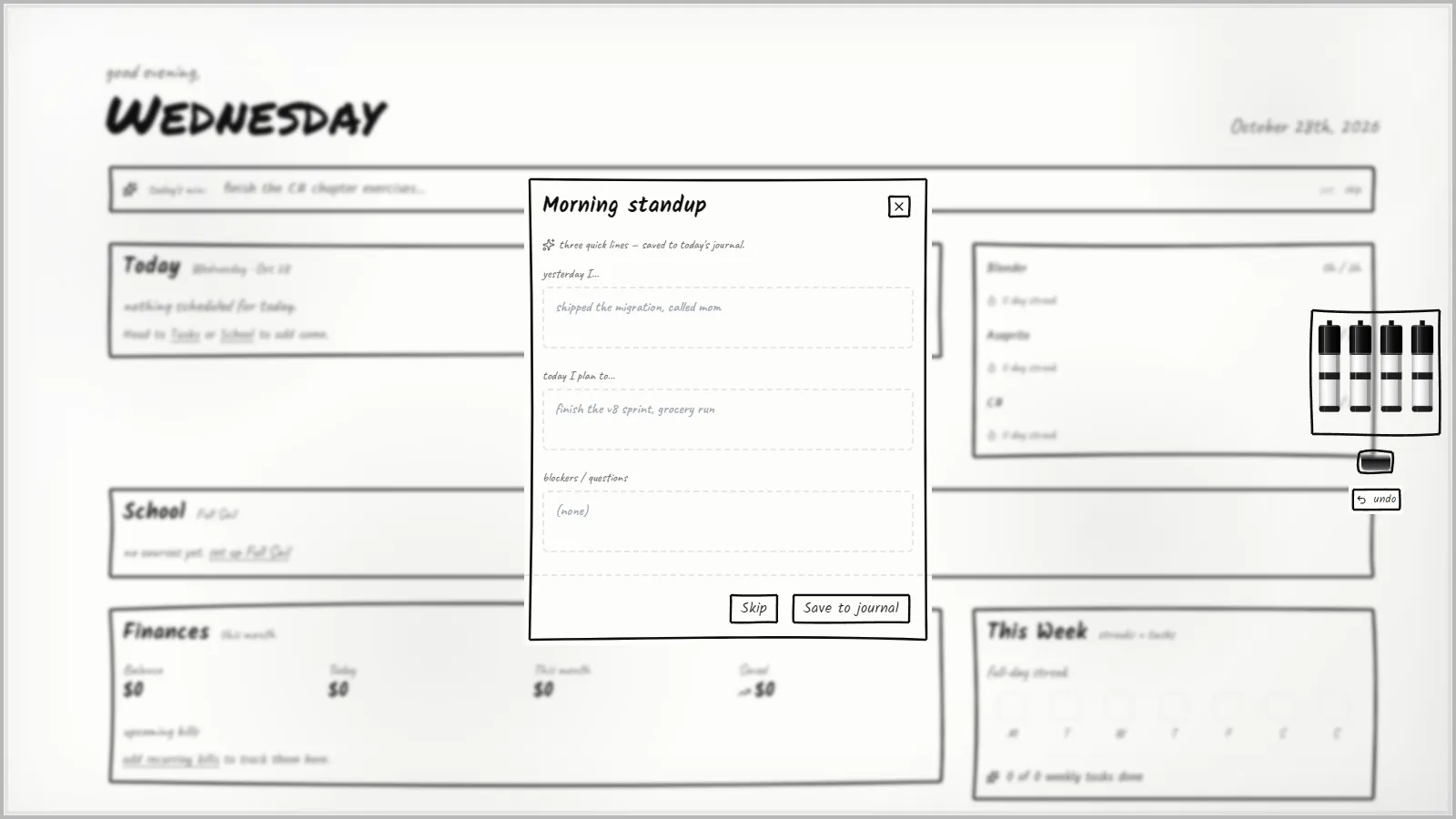
The morning standup: three quick lines that are saved to that day’s journal.
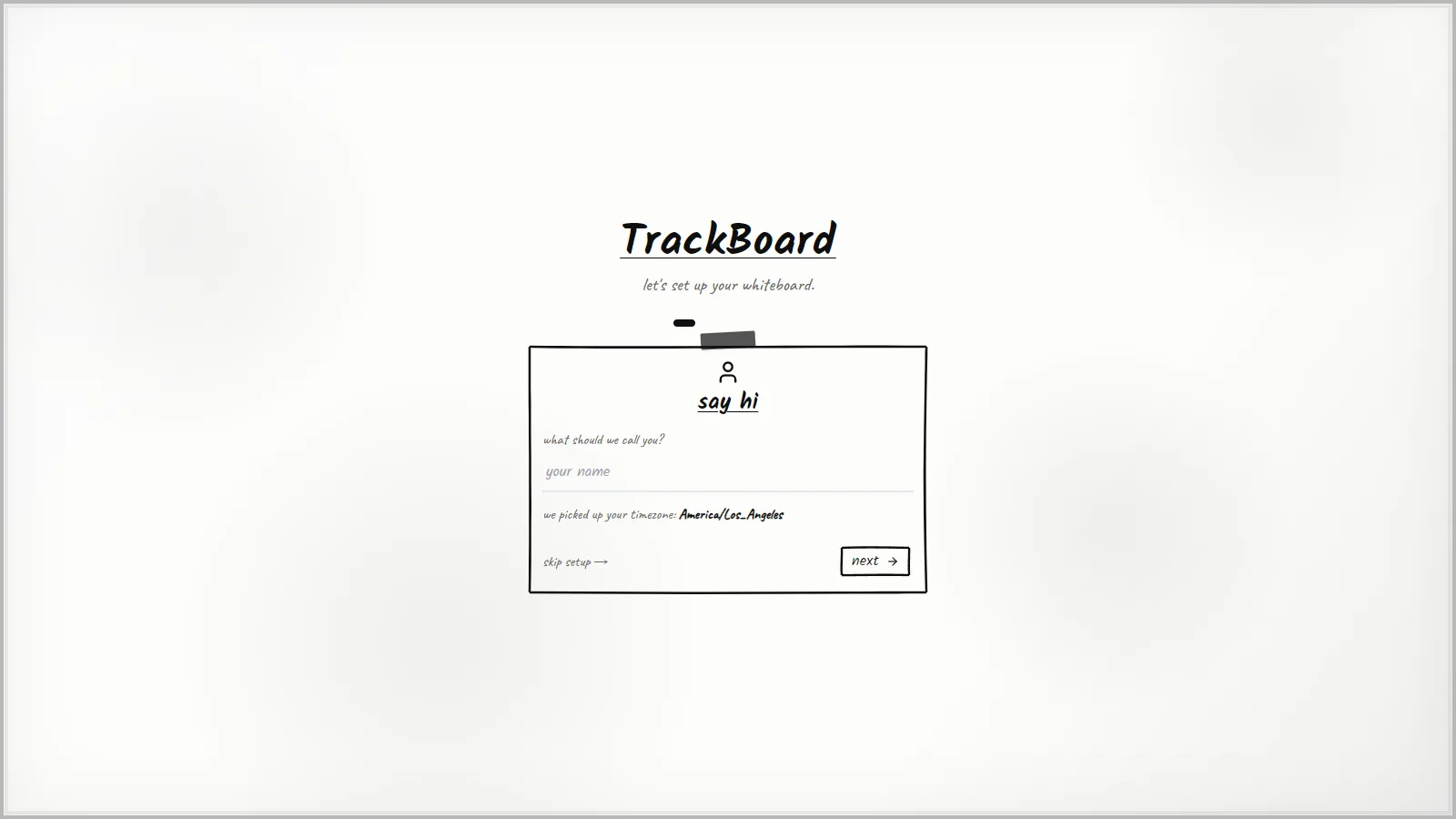
First run asks for a name and picks up your timezone, or you can skip setup.
Features
- Tasks and projects: kanban status, subprojects, smart lists (saved filters), task and project templates,
recurring tasks, attachments, links between tasks, and a quick-add box that understands plain English
(
Pay rent every 1st !2 #billssets the repeat, priority and category) - Task import: CSV or JSON exports from other task managers (Todoist, TickTick and Things style columns)
- Focus: a focus timer with Pomodoro breaks, time history per task, and an estimate-versus-actual card
- Planning: dashboard, calendar, a 14-day forecast of everything coming up, daily intention, morning stand-up, end-of-day shutdown ritual, weekly review, and yearly or quarterly goals
- Habits: streaks with streak freezes, weekly targets, heatmaps and weekday insights
- Skills: practice sessions, drag-to-schedule practice blocks, per-skill reminders
- School: courses, class links and assignments; a Canvas API token can be saved (encrypted on the device)
- Money: accounts, transactions with CSV import, recurring bills, budget categories and savings goals
- Journal with mood charts, a freehand whiteboard (one per project as well), and a year-in-review Wrapped page
- Optional AI with your own Anthropic API key (stored encrypted on the device, never synced): brain dump to tasks, plan my day, weekly summary, and task auto-categorising
- Optional sync: email magic link, email and password, Google or Apple sign-in; live updates between devices; share a project with another user by share code (read-only for now)
- Optional push reminders: high-priority tasks due today, assignments due within 24 hours, bills, and habit and skill reminders
- Calendar export: download an
.icsfile, or subscribe to a per-user calendar feed (needs Supabase) - Command palette (
Ctrl+K), keyboard chords (gthentfor Tasks,gcfor Calendar,nfor a new task), voice capture, swipe and long-press gestures on phones, pull to refresh, light and dark themes, onboarding wizard, and a full JSON backup export
Requirements
- Node.js
^20.19.0or>=22.12.0(what Vite 8.0.10 requires, frompackage-lock.json) and npm - A current Chrome, Edge, Safari or Firefox. Push reminders on an iPhone need iOS 16.4 or later and the app added to the home screen.
- Main locked versions: React 19.2.5, React Router 7.14.2, TypeScript 6.0.3, Vite 8.0.10, Tailwind CSS 3.4.19, Dexie 4.4.2, Zustand 5.0.12, @supabase/supabase-js 2.105.0, vite-plugin-pwa 1.2.0, Vitest 4.1.5
- Optional, for sync and reminders: a Supabase project (Postgres, Auth, Realtime, Storage,
Edge Functions, and the
pg_cronandpg_netextensions), the Supabase CLI, and a host for the built site (Vercel is what this project used; any static host works) - Optional, for AI features: an Anthropic API key
Install
These steps come from package.json and the setup guides in supabase/. They have never been tested on a fresh PC.
Windows (PowerShell):
- Install Node.js 22 LTS from nodejs.org and Git from git-scm.com.
- Get the code:
git clone https://github.com/DaffyDabz/trackboard.git cd trackboard - Install packages (
.npmrcsetslegacy-peer-deps=true, so peer-version conflicts do not stop the install):npm install - Start it and open http://localhost:5173:
npm run dev
With no configuration the app runs fully on your device: the sign-in and sync screens stay hidden and everything is saved in the browser.
Optional: Supabase sync
- Create a project at supabase.com.
- Copy the example settings and fill in your project URL and publishable (anon) key from
Project Settings > API. Never put the
service_rolekey in this file.Copy-Item .env.example .env.local notepad .env.local - Set up the database. The original tables (tasks, projects, skills, accounts and the rest) were created by hand in
the Supabase dashboard and are not in the repo yet; the files in
supabase/migrations/only add to them. A fresh project needs that base schema first. Then run the migrations in date order in Studio > SQL Editor (seesupabase/migrations/README.md). - Under Authentication > URL Configuration > Redirect URLs, add
http://localhost:5173/and your deployed URL. For Google or Apple sign-in, followsupabase/OAUTH_SETUP.md. - Restart
npm run dev. The app now asks you to sign in and syncs.
Optional: push reminders
Follow supabase/PUSH_SETUP.md. In short:
- Make a VAPID key pair (the keys browsers use to trust your push messages):
npx web-push generate-vapid-keys - Put the public key in
VITE_VAPID_PUBLIC_KEY(in.env.localand on your host). - Give the Edge Functions their secrets and deploy them:
supabase login supabase link --project-ref <your-project-ref> supabase secrets set VAPID_PUBLIC_KEY="<public-key>" VAPID_PRIVATE_KEY="<private-key>" VAPID_SUBJECT="mailto:you@example.com" supabase functions deploy send-notification --no-verify-jwt supabase functions deploy notify-due --no-verify-jwt--no-verify-jwtlets anyone who knows a function’s URL call it, sosend-notificationchecks the caller itself: only the server’s own reminder job (the service-role key) or the signed-in owner ofuser_idcan send. Paste the keys without the< >(the function also strips stray quotes and brackets). - Run
supabase/migrations/20260430_push_tables.sql(it creates thepush_subscriptionsandnotifications_senttables with row-level security), then schedule thepg_cronjobs that callnotify-dueevery 5 minutes and clean up once a day, as described insupabase/README.md. Keep any key a cron job needs in Supabase Vault, never typed into SQL files. - In the app: Settings > Notifications > Enable, then Test.
Habit and skill reminders at an exact time use a third function, reminder-dispatcher, scheduled every minute; its
deploy and cron.schedule example are in the comment at the top of
supabase/functions/reminder-dispatcher/index.ts. The calendar feed needs
supabase functions deploy ical-feed --no-verify-jwt.
Run / Use
| Command | What it does |
|---|---|
npm run dev |
Development server on http://localhost:5173 (the service worker is off here, so offline mode and push only work in a production build) |
npm run build |
Type-check, then build the site into dist/ |
npm run preview |
Serve the built dist/ locally to try the real PWA |
First steps:
- The onboarding wizard adds three starter skills; change their goals or remove them.
- Add tasks from the quick-add box (
n), or pressCtrl+Kto search and jump anywhere. - Install it: in Chrome or Edge use Install app in the address bar; on an iPhone use Safari’s Share > Add to Home Screen.
- Back up: Settings has a full JSON export. Without sync, your data lives only in that browser, so clearing the site data deletes it.
Configuration
Environment variables (VITE_ ones are built into the site at build time, so rebuild or redeploy after a change):
| Variable | Where | Used for |
|---|---|---|
VITE_SUPABASE_URL |
.env.local and your host |
Supabase project URL; sync and sign-in |
VITE_SUPABASE_ANON_KEY |
.env.local and your host |
Publishable (anon) key only; sync and sign-in |
VITE_VAPID_PUBLIC_KEY |
.env.local and your host |
Push reminders (not in .env.example; add it yourself) |
VAPID_PUBLIC_KEY, VAPID_PRIVATE_KEY, VAPID_SUBJECT |
supabase secrets set |
Edge Functions that send push |
SUPABASE_URL, SUPABASE_SERVICE_ROLE_KEY |
Set by Supabase for Edge Functions | Server-side database access |
SUPABASE_PROJECT_ID |
Your shell | Only for npm run supabase:typegen |
ANALYZE=1 |
Your shell | npm run build also writes dist/bundle-stats.html |
Example .env.local (placeholders):
VITE_SUPABASE_URL=https://your-project.supabase.co
VITE_SUPABASE_ANON_KEY=your-publishable-anon-key
VITE_VAPID_PUBLIC_KEY=your-vapid-public-key.env, .env.* (except .env.example) and .vercel/ are gitignored.
Settings saved inside the app (in the browser, not in files): the Anthropic API key and model (default
claude-sonnet-4-5), the Canvas token, theme, notifications, shutdown-ritual time, swipe actions and auto-archive days.
How it works
- App: a React single-page app with React Router, built by Vite and styled with Tailwind CSS. Charts and borders get their hand-drawn look from rough.js. Small UI state lives in Zustand stores.
- Data: each device keeps everything in IndexedDB (the browser’s built-in database) through Dexie
(
src/lib/db). The app never needs a server to work. - Sync (
src/lib/sync.ts): when signed in, on app start and when the tab regains focus, every table is compared with Supabase. The newerupdated_atwins, local-only rows are pushed and remote-only rows are pulled.src/lib/realtime.tslistens for database changes and applies them straight away. Row-level security policies in Postgres keep each user’s rows private. - PWA:
vite-plugin-pwaininjectManifestmode buildssrc/sw.ts, which pre-caches the app with Workbox and handles push messages and notification clicks. New versions show an update prompt. - Push: the browser subscribes with the VAPID public key and stores the subscription in
push_subscriptions.pg_croncallsnotify-dueevery 5 minutes; it finds what is due for each user with notifications on, skips anything already sent in the last 18 hours (notifications_sent), and callssend-notification, which sends to every device of that user and deletes dead subscriptions.reminder-dispatcherhandles exact-time habit and skill reminders. - Calendar: the
.icsdownload is built in the browser (practice sessions, assignments and bills). Theical-feedfunction serves a live feed (tasks, assignments, bills for the next 90 days, practice sessions); the token in its URL is the user’s id. - AI: the browser calls the Anthropic API directly with your own key (
src/lib/ai.ts); nothing goes through a TrackBoard server. - Token encryption: the Canvas and Anthropic keys are encrypted with AES-GCM using a key that never leaves the
device (
src/lib/crypto/canvasToken.ts), so a leak of the settings table does not expose them. A second device asks for the token again.
Project layout
| Path | What lives there |
|---|---|
src/pages/ |
One file per screen: Dashboard, Tasks, Projects, Calendar, Forecast, Habits, Skills, School, Finance, Journal, Goals, Whiteboard, Wrapped, Settings and more |
src/components/ |
Shared parts: hand-drawn controls (ui/), charts, layout and navigation, sign-in, onboarding, focus timer, AI panels, modals |
src/lib/ |
App logic: sync, realtime, push, AI, quick-add parser, recurring tasks, imports and exports, keyboard chords |
src/lib/db/ |
Dexie database and schema, per-feature data helpers, Supabase row mappers, unit tests |
src/lib/crypto/ |
On-device token encryption |
src/sw.ts |
Service worker (precache, push, notification clicks) |
public/ |
App icons |
supabase/functions/ |
Edge Functions: send-notification, notify-due, reminder-dispatcher, ical-feed |
supabase/migrations/ |
Dated SQL migrations, applied by hand |
supabase/OAUTH_SETUP.md, supabase/PUSH_SETUP.md |
Google and Apple sign-in setup; push setup |
vite.config.ts, tailwind.config.js, eslint.config.js, tsconfig*.json |
Build, style, lint and TypeScript settings |
Development
npm run lint          # ESLint
npm test              # Vitest, once (jsdom; tests live next to the code as *.test.ts)
npm run test:watch    # Vitest in watch mode
npm run test:ui       # Vitest browser UI
npm run build         # tsc -b, then vite build
$env:ANALYZE = '1'; npm run build; Remove-Item Env:ANALYZE   # bundle treemap in dist/bundle-stats.html
npm run supabase:typegen regenerates src/lib/db/supabase-types.ts. The script uses $SUPABASE_PROJECT_ID
(POSIX shell syntax), so on Windows run it from Git Bash or WSL, or run the supabase gen types command yourself.
Deploying the site (Vercel). Vercel detects Vite, runs npm run build and serves dist/. Set the VITE_
variables under Project > Settings > Environment Variables (Production, Preview and Development) and redeploy
after any change, because they are baked in at build time. Either connect the GitHub repo in Vercel (pushes to the
main branch deploy to production, other branches get preview URLs) or deploy from a linked folder with the Vercel CLI
(npx vercel for a preview, npx vercel --prod for production). Add the deployed URL to Supabase’s redirect URLs, and
to the Apple Services ID domains if you use Apple sign-in.
Database changes (Supabase migrations). Each change is a file named YYYYMMDD_short_name.sql in
supabase/migrations/, written with if not exists so it is safe to run again. They are applied by hand: open
Studio > SQL Editor, paste, run. The Supabase CLI migration runner is not used. Add a row to
supabase/migrations/README.md, update the matching mapper in src/lib/db/mappers.ts (sync must keep working before
the migration is applied), and regenerate the types.
Edge Functions deploy with supabase functions deploy <name> --no-verify-jwt. That flag makes each function a
public URL with no sign-in check, so each function must check its caller itself; send-notification does.
Coming soon
Keep this list current: when an item ships, move it to Recent changes with the date, then add what is next.
- Same caller check for
notify-dueandreminder-dispatcher, which are also deployed without sign-in checks - Commit the base database schema so a fresh Supabase project can be set up from the repo alone
- Calendar feed: a random, revocable token in the feed URL instead of the user id
- Canvas LMS import (the token can be saved, but nothing reads from Canvas yet)
- Shared projects with edit rights (sharing is read-only now)
- Per-list swipe actions (one app-wide setting now)
- Use the generated Supabase types in the client instead of the hand-written row types
Recent changes
- 2026-10-04 send-notification checks its caller (service key or the signed-in owner) and accepts push keys pasted with quotes or
; server push works again - 2026-10-04 README: full guide (what it is, install, run, coming soon)
- 2026-10-04 Initial commit: snapshot of the whole app (the first commit in this repo)
Earlier milestones, dated by the database migrations (before the repo existed):
- 2026-05-15 v10: per-task timer sessions and time history
- 2026-05-14 v9: yearly and quarterly goals, sharing projects with other users
- 2026-05-13 v8: AI, focus and stand-up settings, subprojects, attachments, share codes
- 2026-05-12 v7: weekly habit targets and auto-archive
- 2026-05-11 v4: habits and journal sync, smart lists, templates, more task fields
- 2026-04-30 Sort order for skills, accounts, budgets and courses; drag-to-schedule practice blocks; Web Push reminders
Related repositories
None. TrackBoard stands on its own.
Credits and license
Built with React, React Router, TypeScript, Vite, Tailwind CSS, Dexie.js, Zustand, date-fns, chrono-node, rough.js, Lucide, dnd kit, Papa Parse, react-markdown, vite-plugin-pwa and Workbox, web-push, Vitest and Testing Library. Services: Supabase (Postgres, Auth, Realtime, Storage, Edge Functions on Deno), Vercel hosting, and the optional Anthropic API. Each keeps its own license.
TrackBoard itself is an original project by DaffyDabz, released under the MIT License.