Build it with build.cmd (see below), then run AutoClicker.exe. There is no
prebuilt binary in this repository.
Screenshot
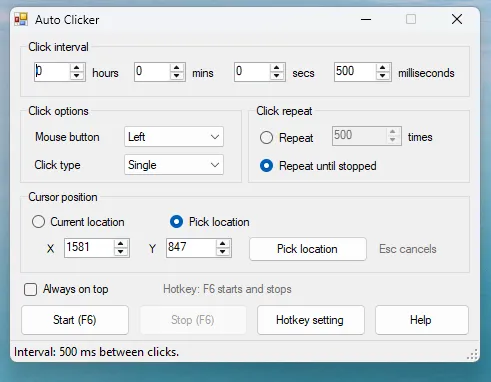
Everything is on one window: how often to click, which button, single or double, how many times, and where.
Features
| Panel | What it does |
|---|---|
| Click interval | Hours / mins / secs / milliseconds, all added together. Leave every box at 0 to click as fast as the machine allows. |
| Click options | Left, middle or right button; single or double click per repeat. |
| Click repeat | Stop after a set number of clicks, or keep going until you stop it. |
| Cursor position | Click wherever the pointer happens to be, or lock onto fixed screen coordinates. |
| Pick location | Press it, then click the spot you want. That click is swallowed, so nothing gets pressed for real. Esc cancels. |
| Hotkey | F6 by default. Starts and stops from anywhere, even while another app has focus. Rebind it with Hotkey setting (modifier combinations like Ctrl+Shift+F8 work). |
| Always on top | Keeps the window above whatever you are clicking on. |
Every setting is remembered between runs in
%APPDATA%\AutoClicker\settings.ini.
It will not click its own window
When you start a run and then move the mouse toward your target, the pointer crosses the Auto Clicker window on the way — and the clicker is already firing. A stray click landing on Stop would end the run after a single click.
So before every click the engine checks which window is under the pointer, and withholds the click if that window belongs to Auto Clicker. A withheld click does not consume a repeat, so a “Repeat 20 times” run still delivers all 20. The status bar says “Waiting - the pointer is over Auto Clicker” while this is happening, and clicking resumes the moment you move onto the target.
Rapid clicks and double-click detection
Windows apps decide for themselves that two clicks close together are a
double-click — the threshold is the system double-click time (500 ms by
default) as long as the pointer has not moved more than a few pixels. In
Pick location mode the pointer never moves at all, so any interval under
that threshold will be read by the target as double, then triple, then
quadruple clicks. That is the receiving application’s interpretation, not extra
clicks being sent; the engine sends exactly one press and one release per click
and the --clicktest mode verifies that.
If you need clicks treated as distinct singles, use an interval above the system double-click time.
The status bar always shows the current interval in h / m / s / ms form, so a
value like 46 m 2 s is obvious rather than hiding as a large second count.
How it works
- Clicks are sent with
SendInput, the same API real mice feed into, so they land in apps that ignore oldermouse_event-based clickers. - The clicking runs on its own thread at raised priority, with the system timer pushed to 1 ms resolution while active. The pacing loop sleeps coarsely, then finishes on a short spin, so intervals stay accurate down to a few milliseconds instead of snapping to Windows’ default ~15 ms tick.
- If the machine cannot keep up with the requested rate, the scheduler resyncs rather than firing a catch-up burst.
- The UI thread does nothing during a run except tick a counter, which is why the stop hotkey always answers, even at maximum click rate.
Building
build.cmdThat invokes C:\Windows\Microsoft.NET\Framework64\v4.0.30319\csc.exe directly.
The source targets C# 5 so that in-box compiler accepts it.
Tests
Five headless modes, none of which shows a window:
AutoClicker.exe --selftest    C:\path\to\selftest.log
AutoClicker.exe --clicktest   C:\path\to\clicktest.log
AutoClicker.exe --repeattest  C:\path\to\repeattest.log
AutoClicker.exe --pendingtest C:\path\to\pendingtest.log
AutoClicker.exe --guardtest   C:\path\to\guardtest.log
--selftest checks interval arithmetic, config building, hotkey display
round-trips, the marshalled INPUT struct size, and settings persistence
(against an isolated temp file — it never reads or writes your real settings).
--clicktest is the real end-to-end run: it installs a low-level mouse hook
first, then drives the actual click engine, and swallows every injected
click inside the hook so nothing on the desktop ever receives one. It aborts
without sending anything if the hook cannot be installed. It verifies the click
count, that Windows flagged each event as injected, that none escaped, and that
measured pacing matches the target.
--repeattest drives the real Start-button code path and checks a counted run
delivers exactly N clicks and hands the controls back afterwards.
--pendingtest checks a number typed into a spin box is the one actually used,
even if you never leave the field before pressing the hotkey.
--guardtest is the regression test for the self-click bug: with the pointer
over our own window it asserts zero clicks are sent, zero repeats are consumed
and the run stays alive; then it moves the pointer away and asserts the full
count is delivered.
All modes exit 0 on success and write a pass/fail report to the log path.
Notes
- Anti-cheat systems in online games generally detect and act on injected input. This is a desktop utility; using it in a game that forbids automation is on you.
- Some antivirus products flag any auto clicker as a potentially unwanted program, because global hotkeys plus synthetic input is also what input malware looks like. The full source is right here if yours complains.
- Fixed-position coordinates are physical screen pixels. The app declares itself DPI-aware so picked coordinates stay correct on scaled displays.
Status
Feature-complete and working on Windows 11. Windows only.
Built with
C# 5, Windows Forms and the Win32 SendInput / low-level hook APIs, compiled with
the csc.exe that ships with the .NET Framework 4.x.
License
All rights reserved for now.