Or press play and it reads the book aloud with Kokoro text-to-speech running on your own PC (on the GPU when there is an NVIDIA card), lighting up the sentence being read. Either way it remembers your place to the sentence, and it has a built-in catalog of free Project Gutenberg books. The name is a mimic of a book: feed it text, it speaks.
Status: version 0.3.0 (build 2026.08.20.2), used daily on one Windows 11 PC with an NVIDIA RTX 4070 Ti; Windows only · Visibility: public · Last updated: 2026-10-04
Contents
- Screenshots
- Features
- Requirements
- Install
- Run
- Configuration
- How it works
- Project layout
- Development
- Coming soon
- Recent changes
- Credits and license
Screenshots
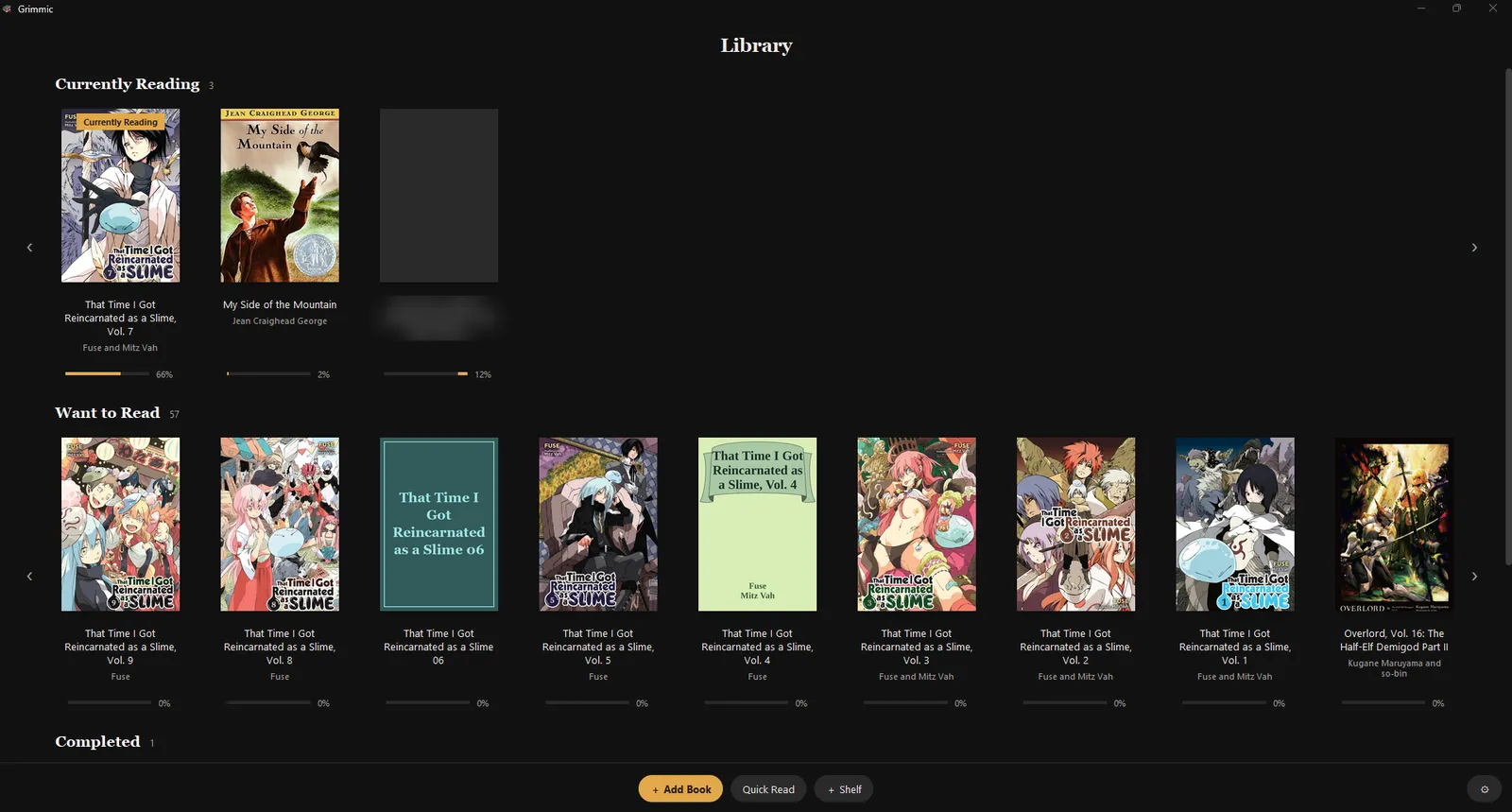
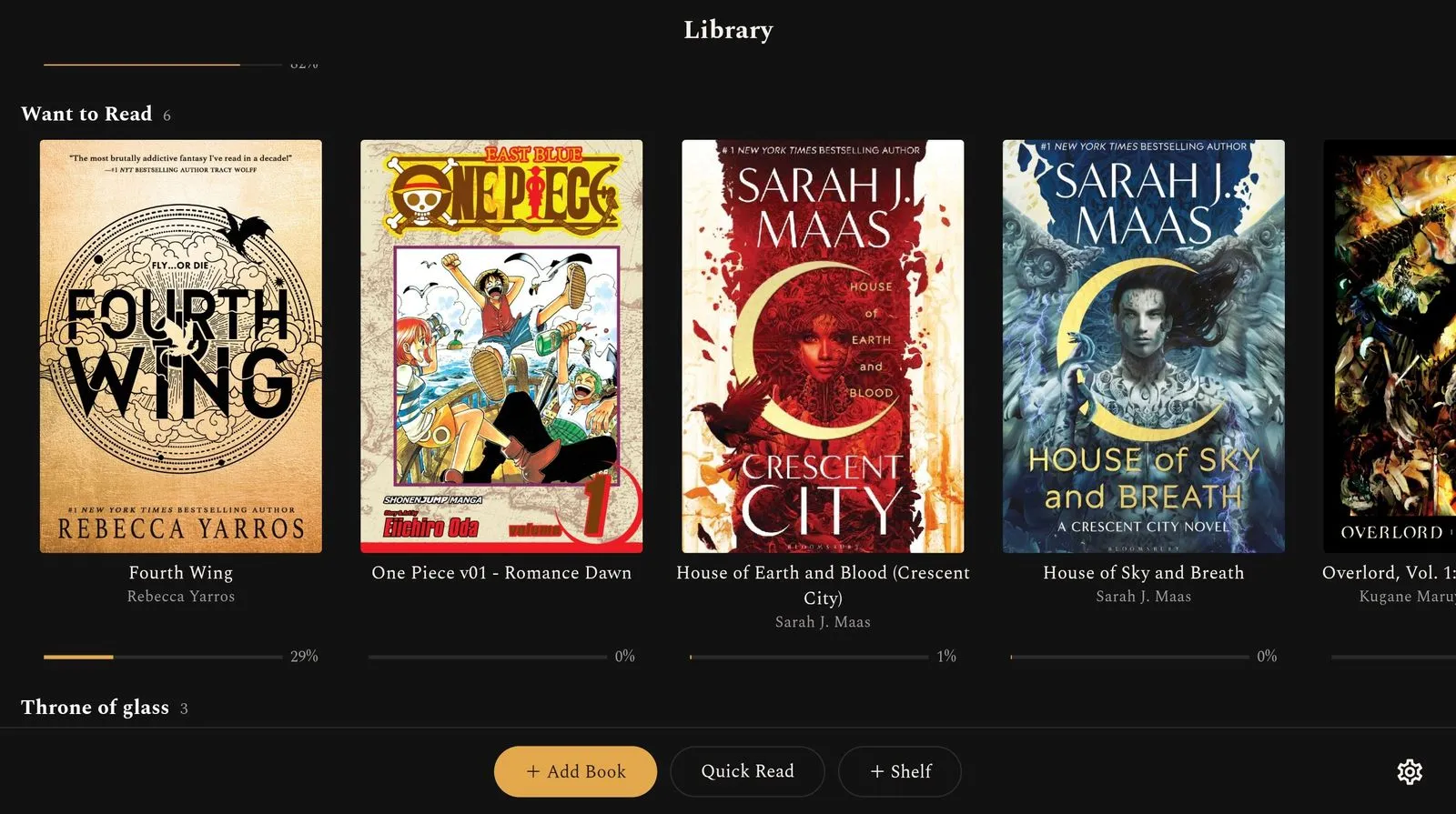
The Library on a Windows PC: your shelves of covers in rows, each with how far you have read.
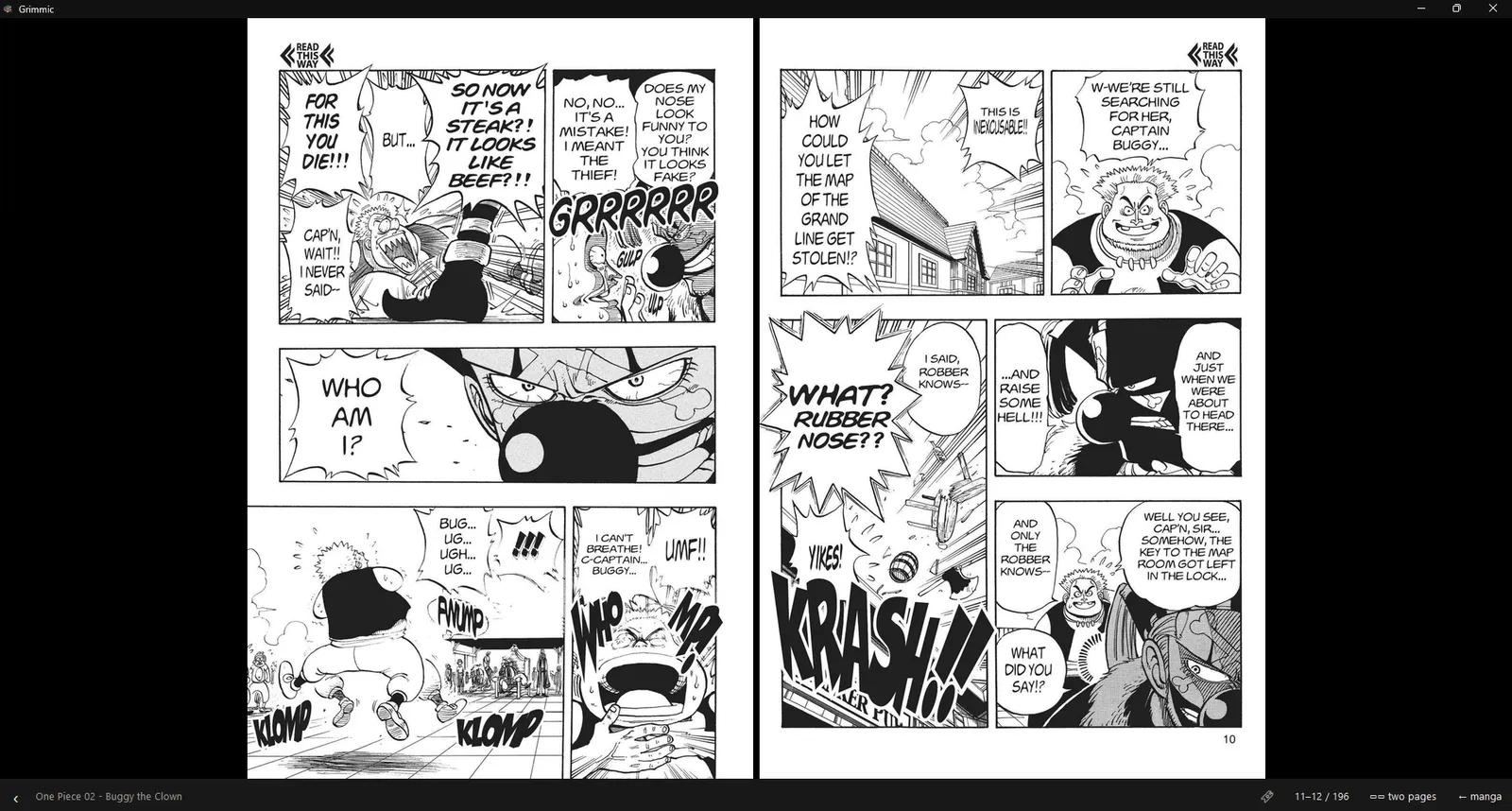
The comic viewer showing a manga two pages at a time, read right to left.
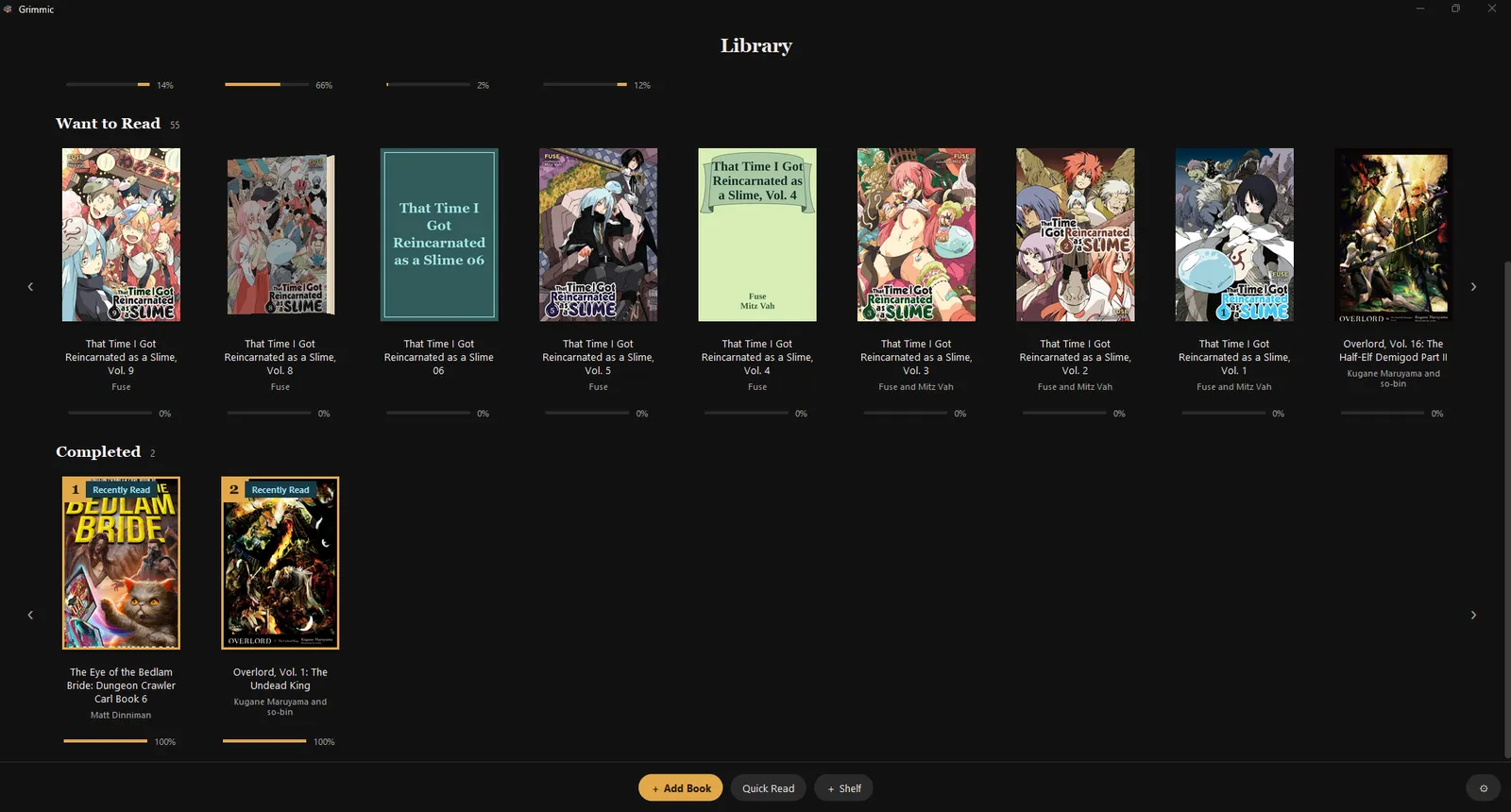
Further down the Library: the Completed shelf, with the optional rank badges on the covers.
Features
Library
- A bookshelf of covers in rows (Currently Reading, Want to Read, Completed, plus your own shelves), with progress, favourites, drag-to-reorder and optional top-10 rank badges per shelf
- Add books with the Add Book button or by dragging files or whole folders onto the window; files are copied into the library, so the originals can move later
- Calibre import: real titles, authors and covers from a Calibre library, EPUB preferred; a re-sync only adds new books. Kindle-only formats (AZW3, MOBI) are listed as skipped; convert them to EPUB in Calibre first
- Create a book from pasted text, chapter by chapter, with your own cover; Quick Read for a one-off paste
- Books whose file is still in the library folder but whose entry was lost are put back on the shelf at launch
- A book reaching 95% moves itself to Completed
Discover
- Free books from Project Gutenberg through the Gutendex API: a Top 100 row, genre rows, an A-Z list, and live search across all of Gutenberg
- A preview card with a summary and a spinning 3D cover, and one-click download straight onto the shelf
Reading and listening
- Two modes: Mimic (read aloud; the current sentence is lit, words tint as they are spoken, and the page follows) and Grimoire (a quiet paged e-reader with fonts, size, line spacing, margins and an opt-in two-page spread)
- Click a sentence to jump there; press and hold (or right-click) a sentence for Highlight, Note, Bookmark, Read from here, Define and Copy
- A progress marker (the bookmark) that only moves forward on its own and asks before it moves back
- In-book search (Ctrl+F), a chapter list, and “pages left in chapter” in Grimoire
- Narration clean-up: Gutenberg headers and licence, publisher and copyright notices, transcriber notes, printed page numbers and picture credits are left out; abbreviations, numbers, money and percentages are spoken in full; PDF hyphenation and line wraps are repaired
- A saved place is remembered by its words as well as its number, so it survives changes to the text clean-up
- Floating captions: the sentence being read in a small always-on-top, click-through window, with a tiny play/back/forward strip, for listening while another app is in front
- Dictionary lookups (online, Free Dictionary API), cached on disk
- Four themes (Midnight, Paper, Ink, Nord), all checked against WCAG AA contrast
- Export a book to MP3
Comics and picture books
- CBZ files, and scanned (image-only) PDFs converted to CBZ on import, open in a full-window page viewer with zoom
- Per-book reading direction (manga right to left) and two-page spreads; “Read as a picture book” on a card’s right-click menu turns an illustrated EPUB into a comic
Read anything, anywhere
- Ctrl+Shift+R reads the text selected in any other app, then restores your clipboard; Ctrl+Shift+S stops
Engine
- Automatic fallback: Kokoro on CUDA, then Kokoro on CPU (about five times faster than real time on the author’s CPU), then edge-tts (online Microsoft voices) if the Kokoro model files are missing or fail to load
- Reading positions are saved on every sentence and on a short timer, with atomic temp-file-and-rename writes, so killing the process loses at most the sentence being spoken
Requirements
| What | Version |
|---|---|
| OS | Windows 10 or 11, 64-bit (it uses Win32 APIs for hotkeys, the tray, the window and the single-instance lock) |
| Python | 3.10, 64-bit, with tkinter (the python.org installer includes it). Developed on 3.10.6 |
| Python packages | pinned in requirements.txt; the main ones: kokoro-onnx==0.5.0, onnxruntime-gpu==1.23.2, edge-tts==7.2.8, EbookLib==0.20, pypdf==6.14.2, pillow==12.3.0, numpy==2.2.6, sounddevice==0.5.5, lameenc==1.8.4, keyboard==0.13.5, pystray==0.19.5 |
Not in requirements.txt yet |
pymupdf==1.28.0 (PDF covers and scanned-PDF comics) and tkinterdnd2==0.6.2 (drag and drop); both optional, but install them |
| GPU (optional) | An NVIDIA card with a recent driver. CUDA 12.9 and cuDNN come as pip wheels (nvidia-*-cu12, a few GB), not a system install |
| Voice models | kokoro-v1.0.onnx (about 310 MB) and voices-v1.0.bin from the kokoro-onnx releases |
| Disk | About 3.5 GB for the GPU venv and models; much less for CPU-only |
| Internet | Only for Discover, the dictionary and the edge-tts fallback. Reading and Kokoro voices work offline |
Keep nvidia-cudnn-cu12 at 9.10.x: newer cuDNN releases (9.24) break the convolution graph builder in
onnxruntime 1.23.
Install
These steps match the scripts and code in this repo, but they have only ever been run on the author’s own PC, never on a fresh one. Run them in PowerShell.
-
Install Python 3.10 (64-bit) from https://www.python.org/downloads/windows/. Keep “py launcher” ticked.
-
Get the code:
git clone https://github.com/DaffyDabz/grimmic.git cd grimmic -
Create the virtual environment. It must be called
venvand sit in the repo folder, becauserun.bat,run_debug.batandGrimmic.speclook for it there:py -3.10 -m venv venv -
Install the packages (with an NVIDIA GPU):
.\venv\Scripts\python.exe -m pip install -r requirements.txt
.\venv\Scripts\python.exe -m pip install pymupdf==1.28.0 tkinterdnd2==0.6.2
No NVIDIA GPU? Skip the multi-GB CUDA wheels and use the plain CPU build of ONNX Runtime instead (untested, but the engine already falls back to the CPU when CUDA is not there):
Get-Content requirements.txt | Where-Object { $_ -notmatch '^(nvidia-|onnxruntime-gpu)' } | Set-Content requirements-cpu.txt .\venv\Scripts\python.exe -m pip install -r requirements-cpu.txt onnxruntime==1.23.2 pymupdf==1.28.0 tkinterdnd2==0.6.2 -
Download the Kokoro voice models into a
modelsfolder next tomain.py(they are not in this repo):New-Item -ItemType Directory -Force models $ProgressPreference = 'SilentlyContinue' # makes Invoke-WebRequest much faster Invoke-WebRequest https://github.com/thewh1teagle/kokoro-onnx/releases/download/model-files-v1.0/kokoro-v1.0.onnx -OutFile models\kokoro-v1.0.onnx Invoke-WebRequest https://github.com/thewh1teagle/kokoro-onnx/releases/download/model-files-v1.0/voices-v1.0.bin -OutFile models\voices-v1.0.binWithout these two files Grimmic still starts, but reads with the online edge-tts voices instead.
Run
- Double-click
run.bat(no console window), orrun_debug.bat(with a console that shows logs and errors). - Or from PowerShell:
.\venv\Scripts\python.exe main.py
Only one Grimmic runs at a time; launching it again brings the open window forward. The first launch takes a few seconds while the voice model loads; the engine in use (CUDA, CPU or edge-tts) is shown at the bottom of the settings panel.
First steps:
- On the Library, press Add Book (or drag files onto the window), or open Discover and pick a free classic.
- Click a cover to open it. The bottom bar’s mode button switches between Mimic (read aloud) and Grimoire (paged).
- Press Space to start reading aloud.
| Action | Control |
|---|---|
| Play / pause | Space |
| Seek back / forward 10 s | Left / Right (tap twice for 30 s, hold to scrub) |
| Jump to a sentence | Click it |
| Highlight, note, bookmark, read from here, define, copy | Press and hold a sentence, or right-click it |
| Set the progress marker (bookmark) here | Ctrl+B |
| Search in the book | Ctrl+F |
| Chapter list | ☰ on the reader bar |
| Font, size, spacing, margins, two-page spread | Aa on the reader bar |
| Volume, speed, voice, MP3 export | The speaker button on the reader bar |
| Back to the shelf | Esc, or ‹ on the bar |
| Read the selected text in any app | Ctrl+Shift+R |
| Stop | Ctrl+Shift+S |
Notes:
- Closing the window (X) saves everything and quits. The tray icon and the global hotkeys only work while Grimmic is open.
- Ctrl+Shift+R can only restore plain-text clipboard contents. Global hotkeys cannot reach apps running as Administrator unless Grimmic runs elevated too.
Configuration
Everything is set from inside the app (the Library’s gear, the reader’s Aa and speaker buttons). Files, for reference:
| Path | What it holds |
|---|---|
%APPDATA%\Grimmic\settings.json |
Settings: voice (default af_heart), speed (0.92), volume, theme (midnight, paper, ink, nord), reader_mode (mimic or grimoire), Grimoire font/size/spacing/margin, two_page, word_follow, follow_reading, page_anim, skip_frontmatter, trim_boilerplate, trim_publisher, captions and its size/opacity/position, resume_on_launch, calibre_dir, window position |
%APPDATA%\Grimmic\data\library.json |
Books, shelves, positions, bookmarks, highlights and notes |
%APPDATA%\Grimmic\data\library\, covers\ |
Copies of your books and their covers |
%APPDATA%\Grimmic\data\progress\ |
One small progress file per book, a safety net that is merged back at launch |
%APPDATA%\Grimmic\data\downloads\, catalog_* |
Discover downloads, cover thumbnails and the cached Gutenberg catalog |
%APPDATA%\Grimmic\grimmic_debug.log |
Best-effort diagnostic log |
models\ next to main.py (or next to Grimmic.exe) |
The Kokoro model and voices |
Environment variable: AIREADER_DATA moves the whole data folder somewhere else, for example
$env:AIREADER_DATA = "$env:TEMP\grimmic-test". The tests use it so they never touch your real library.
Settings files written by an older version are upgraded in place when a default changes.
How it works
main.pyclaims a single-instance lock, gives the app its own taskbar identity, builds the Tk window and the tray and hotkey helper, and ends the process outright on exit so nothing lingers holding the lock.- Loading and text.
reader/loaders.pyturns EPUB, PDF, TXT and Markdown into raw text.reader/textproc.pysplits it into sentences, each with a display span and a “speak” version (abbreviations, numbers and money written out) and a pause length. - Voice.
reader/engine.pypicks the engine: Kokoro through ONNX Runtime on CUDA, then CPU, then edge-tts. Kokoro turns text into phonemes with espeak-ng (shipped inside theespeakng-loaderpackage).reader/player.pysynthesises a little ahead of the sentence being heard and plays it withsounddevice. - App.
reader/ui.pyis the shell: the Library (shelf_ui.py), the reader in its two modes, Discover (discover_ui.pyandcatalog.py) and the comic viewer (manga.py,manga_ui.py). Views are stacked and raised, so switching is instant. - Storage.
reader/store.pykeeps the library in one JSON file with atomic writes, a lock against the import thread, per-book progress sidecars and orphan recovery.reader/importer.pyimports in a background thread. - Extras.
captions.py(floating captions),tray_hotkeys.py(tray, global hotkeys, clipboard capture),exporter.py(MP3 export withlameenc),book3d.py(pre-rendered 3D cover effects),theme.py(the four palettes and the rounded widgets). exporter.bake_package()andtools/serve_packages.pyare left from an earlier phone design (the PC renders the audio, the phone plays it). The phone app no longer uses them; it is standalone and speaks on the device.
Project layout
| Path | What lives there |
|---|---|
main.py |
Entry point: single instance, data migration, window and tray setup |
reader/ |
The app: UI, engine, player, loaders, text pipeline, library store, catalog, comics, captions |
reader/version.py |
Version and build id, kept in step with the phone app |
assets/ |
The Grimmic icon in every size (grimmic.ico, grimmic_*.png) |
tests/ |
Plain-script tests, one per area, plus small fixture books |
tools/make_icon.py |
An older procedural icon generator (not used for the current icon) |
tools/serve_packages.py |
A tiny HTTP server with byte-range support for baked book packages (see above) |
installer/Grimmic.iss |
Inno Setup script for a Windows installer (written, never built) |
Grimmic.spec |
PyInstaller build of Grimmic.exe |
run.bat, run_debug.bat |
Launchers (no console / with console) |
models/ |
Kokoro model files (you download them; git ignores the folder) |
Development
Tests are plain Python scripts, each printing pass or fail. Point them at a throwaway data folder first, because
tests\test_core.py does not set one itself and would otherwise read your real settings:
$env:AIREADER_DATA = "$env:TEMP\grimmic-test"
.\venv\Scripts\python.exe tests\make_fixtures.py
.\venv\Scripts\python.exe tests\test_core.py           # parsing, engine, player, export
.\venv\Scripts\python.exe tests\test_store.py          # library storage
.\venv\Scripts\python.exe tests\test_gui.py            # scripted GUI session (plays audio)
There are 27 tests\test_*.py scripts; run the one for the area you touched. tests\drive_hotkey_e2e.py
sends real keystrokes to Notepad, so run it only with Grimmic open and nothing else in focus.
Build the Windows app (a PyInstaller “onedir” folder, about 2.8 GB with the CUDA runtime). The models folder must
exist first, because the build copies it in:
.\venv\Scripts\python.exe -m pip install pyinstaller==6.21.0
.\venv\Scripts\python.exe -m PyInstaller Grimmic.spec --noconfirm
# result: dist\Grimmic\Grimmic.exe ; add --clean after changing the icon
Optional installer, with Inno Setup 6 (never built so far):
ISCC.exe installer\Grimmic.iss.
Releases: there are none; the app is built and used locally. When you bump the build, change reader/version.py
here and lib/core/version.dart in grimmic-mobile together; the phone app’s tests check that they match.
Coming soon
Keep this list current: when an item ships, move it to Recent changes with the date, then add what is next.
- Add
pymupdfandtkinterdnd2torequirements.txt, and a CPU-only requirements file without the CUDA wheels - Make
tests\test_core.pyuse its own data folder instead of the real settings - Build and test the Windows installer from
installer\Grimmic.iss(its version still says 1.0) - Sync reading positions with the phone app (the per-book progress files were designed as that format)
- Confirm in daily use that the window and captions reopen on the monitor they were closed on
- Known rough edges: holding the arrow keys can skip unevenly; exporting an MP3 while listening runs two syntheses at once
- Retire the unused phone-package code (
bake_package,tools/serve_packages.py) or document it as a tool
Recent changes
- 2026-10-04 README rewritten as a full guide (install, run, configuration, coming soon)
- 2026-08-20 Build id 2026.08.20.2, matching the phone app
- 2026-08-20 The window reopens on the monitor it was closed on; captions keep their place on a second monitor; X now saves and quits. Also: comics from image-only EPUBs, “Read as a picture book”, per-book reading direction and two-page comic spreads, repair for EPUBs with broken manifests
- 2026-08-12 Books whose file survived but whose library entry was lost are put back on the shelf
- 2026-08-12 Comics open in a page viewer instead of the text reader; scanned PDFs become CBZ on import
- 2026-08-11 Bookmarking from the press-and-hold menu pins the progress marker
- 2026-08-11 Discover gets a Top 100 row; the reader bar gets a speaker button for sound settings
- 2026-08-10 Press and hold a sentence for Highlight, Note, Bookmark, Read from here, Define and Copy (the pen and bookmark buttons are gone)
- 2026-08-10 Narration leaves out publisher matter, copyright notices, transcriber notes, printed page numbers and picture credits; positions are remembered by their words too
- 2026-08-10 The voice models are built into the app instead of being copied in by hand
Credits and license
- Kokoro-82M by hexgrad, Apache-2.0 (the voice model; downloaded separately, not in this repo)
- kokoro-onnx, MIT, which runs Kokoro through ONNX Runtime (MIT)
- espeak-ng, GPL-3.0-or-later, used for phonemes through espeakng-loader and phonemizer-fork (GPL-3.0-or-later)
- edge-tts, LGPL-3.0, for the online fallback voices
- EbookLib (AGPL-3.0) and PyMuPDF (AGPL-3.0 or commercial) for EPUB and PDF; pypdf (BSD-3-Clause); Pillow (MIT-CMU); lameenc (LGPL-3.0); sounddevice (MIT); keyboard (MIT); pystray (LGPL-3.0); tkinterdnd2 (MIT); NVIDIA CUDA and cuDNN wheels under NVIDIA’s own license
- Books and catalog data from Project Gutenberg (most of its books are public domain in the US; check the licence inside each book) through Gutendex
- Definitions from the Free Dictionary API
- Built with Python and tkinter, PyInstaller and Inno Setup
License: Grimmic’s own code is released under the MIT License. The packages above keep their own
licenses. Note that a packaged Grimmic.exe bundles GPL-3.0 (espeak-ng, phonemizer-fork) and AGPL-3.0 (EbookLib,
PyMuPDF) components, so anyone handing out a build has to meet those licenses too (offer the source under
compatible terms).