The repo also holds the Waddle Forever changes the bots need, plus a tester bot that plays every 2005-2008 event like a young kid to find bugs.
Status: running on my home server for the 2005-2010 eras; the install steps below were never tried on a fresh PC · Visibility: public · Last updated: 2026-10-04
Contents
- Bot features
- Screenshots
- Era changes in Waddle Forever
- Requirements
- Install
- Run
- Configuration
- How it works
- Tester
- Project layout
- Development
- Coming soon
- Recent changes
- Related repositories
- Credits and license
Bot features
Everything below is what the code in bots/bots/ and waddle-forever/src/server/socket-server/bots.ts
really does today.
Who they are
- 400 bot penguins, each with a fixed id, its own name (made-up word pairs like SlateWave or HoneySeal, no opening word used more than three times) and a body colour. Old names are kept as aliases, so a rename never breaks a saved buddy.
- Four personalities, 100 bots each: explorer, dancer, helper and playful.
- Every bot has fixed traits worked out from its id: two favourite rooms, a friend group of four, a walking and talking speed, a time of day it likes to be out (morning, afternoon or evening, from the server clock), and whether it is chatty or quiet.
Where they show up
- A room fills when a real player walks in. The bots are placed before the player’s room finishes loading, so nobody pops in. Rooms nobody is watching do no work, and when no player is online every bot leaves.
- At most 8 penguins in a room, players included (6 in the Coffee Shop). Each player who comes in takes a bot’s place, and the server always keeps 4 places free, so a kid is never turned away from a full room.
- The same “regulars” keep turning up: bots are picked by favourite room, time of day, how often they have met the players in the room, the players’ buddies, and friend groups that like to stay together.
- Walk through a door and up to two bots from the room you left come with you, when the two rooms are next to each other on the island.
- Bots only appear in rooms that exist on the server’s date, and never in minigame rooms.
What they do in a room
- Each room has a scene with roles. Coffee Shop: a server, customers and a reader. Pizza Parlor: a waiter, a chef and customers. Night Club: dancers and a DJ. Iceberg: a team trying to tip it. Ice Rink: hockey players, a goalie and a fan. Snow Forts: two snowball teams, a fort builder and a referee. Lighthouse: a band and an audience. Stage: actors and a director. Book Room, Lodge and Boiler Room: readers and storytellers. Gift Shop: a clerk, shoppers and a model. Pet Shop: keepers and visitors. Dojo: students and a coach. Everywhere else: guides, explorers, a lookout and a picnicker.
- In the classic Coffee Shop and Pizza Parlor layouts, staff stand at the counter and customers sit at the real tables.
- They walk, sit, dance, wave and throw snowballs at each other. Each bot also has a goal for the room (serve cocoa, take orders, test the iceberg, build a fort, try every Fair game…) that sets what it does.
- In the Ice Rink they play with the real hockey puck, and back off for 20 seconds after a player touches it.
- They only walk inside each room’s mapped floor, check the whole path, and keep their distance from players: they never walk into or chase a kid. In a room with no mapped floor they stay near where the player came in.
Chat
- Bots in the same friend group hold short four-line conversations. Lines come from the room’s scene, lines for that room (Town, Plaza, Ski Hill, Lodge, Dock, Beach, Mine and more), the bot’s goal, party lines on event dates (Halloween, Christmas, Medieval, Music Jam, the Fair, other parties) and small topic pairs mixed on the fly. Each room remembers its last 80 lines so they do not repeat.
- One bot greets you when you come in. Once it has met you before it says so (“good to see you again!”, “youre back!”), and buddies get a friend greeting.
- They answer you: hello, play, thanks, bye, help and “are you a bot?” (“im a friendly game penguin!”), room words like pizza, cocoa, dance or iceberg, and simple questions in the style of the bot’s personality. The same bot keeps talking to you for a few turns.
- They react: wave and a bot waves back, use an emote and a bot sends the same one, throw a snowball and a bot throws one too. Replies and reactions have short cool-downs so a room never floods.
- Every line was written for this project and is meant for young kids. Player chat is never saved; the bots keep only a count of how often they met each player.
Era outfits
- Bots dress for the server’s date from a wardrobe of 1,818 dated items. An item is used only if it had come out by that date, the era’s client knows it, and the server has its real art.
- Each date gets 24 outfits, built once. Most have four or five matching pieces (by colour, or by theme), some are simple, and they carry pins and backgrounds for the player card. Groups of bots share an outfit, like friends who match.
- Halloween dates bring costumes (ghost, skeleton, witch, vampire, pumpkin and more), Christmas dates holiday outfits, Medieval dates knights and princesses, and about a third of the outfits include that party’s free item.
- A bot keeps the same outfit until the date changes; no costume swaps between rooms.
- A bot’s colour is used only if that colour exists in the era; otherwise it is blue.
Buddies and memory
- Ask a bot to be your buddy and it says yes at once. It shows in your buddy list with its online status and is still there next time you log in, after a server restart, and when the server is switched between Waddle Forever and Houdini. Removing a bot buddy works too.
- Bots remember their visits, the last room they were in, their current goal and how many times they met each player. This is saved to a small state file every 30 seconds and on every buddy change.
- Bots are real penguins on the server, so their player cards open with their outfit.
What they do not do (yet)
- They do not play minigames, sled race, sit at the game tables, own puffles or decorate igloos.
Screenshots
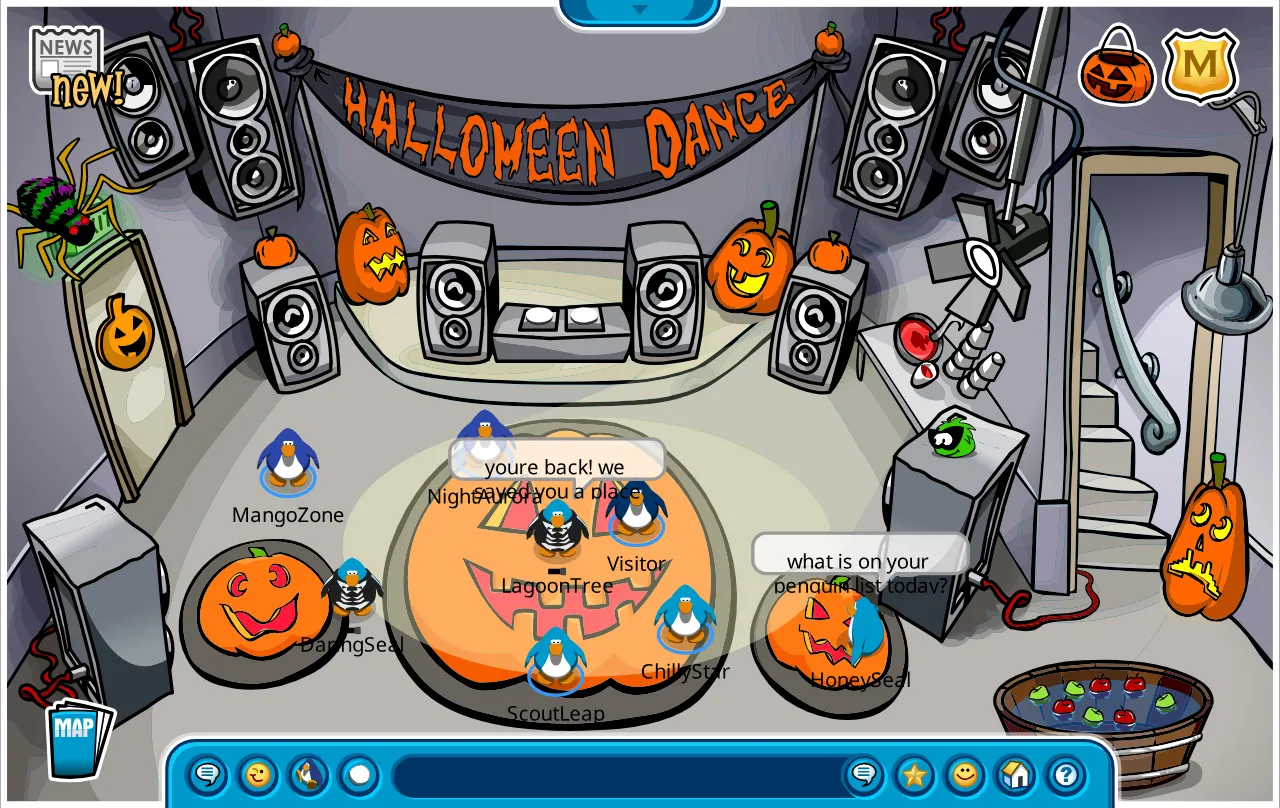
Halloween Party 2007, Night Club: the dance crew in costumes from that date’s wardrobe.
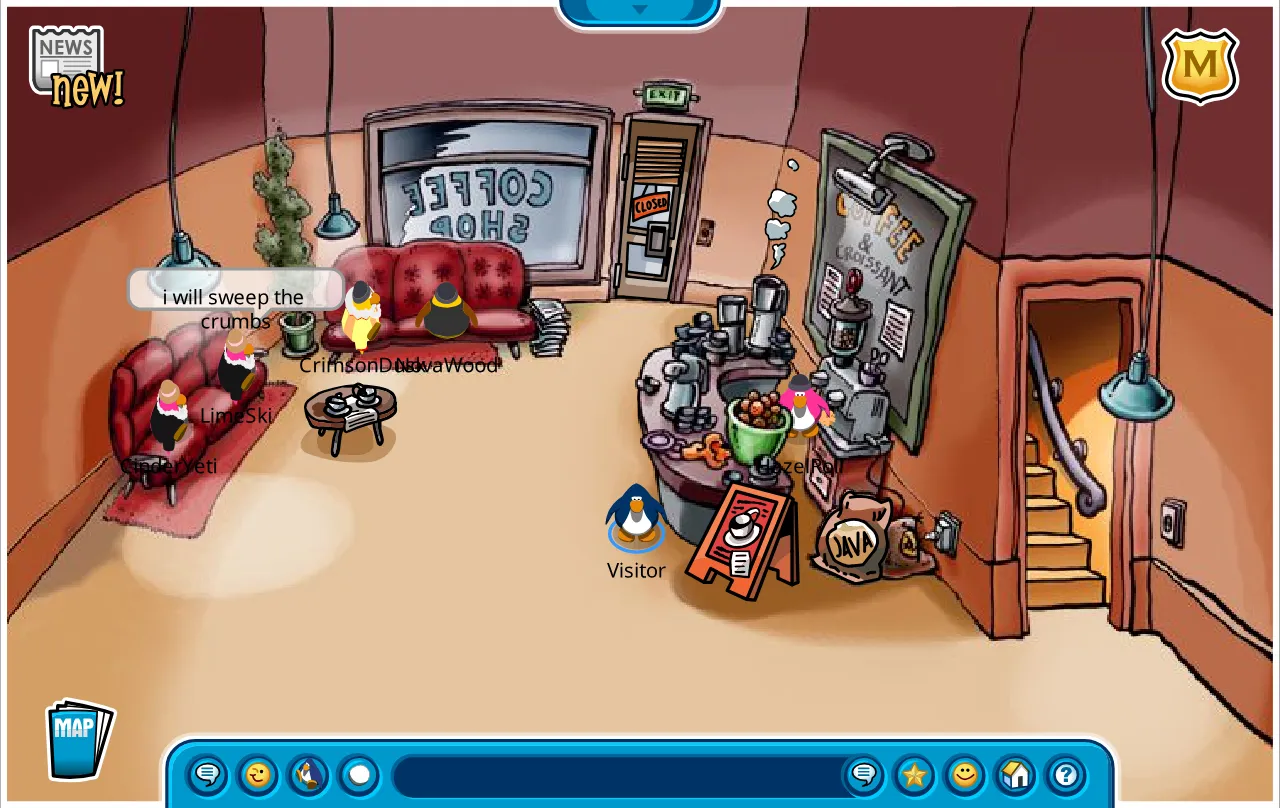
Coffee Shop, November 2007: a server at the counter and customers on the couches, in everyday clothes.
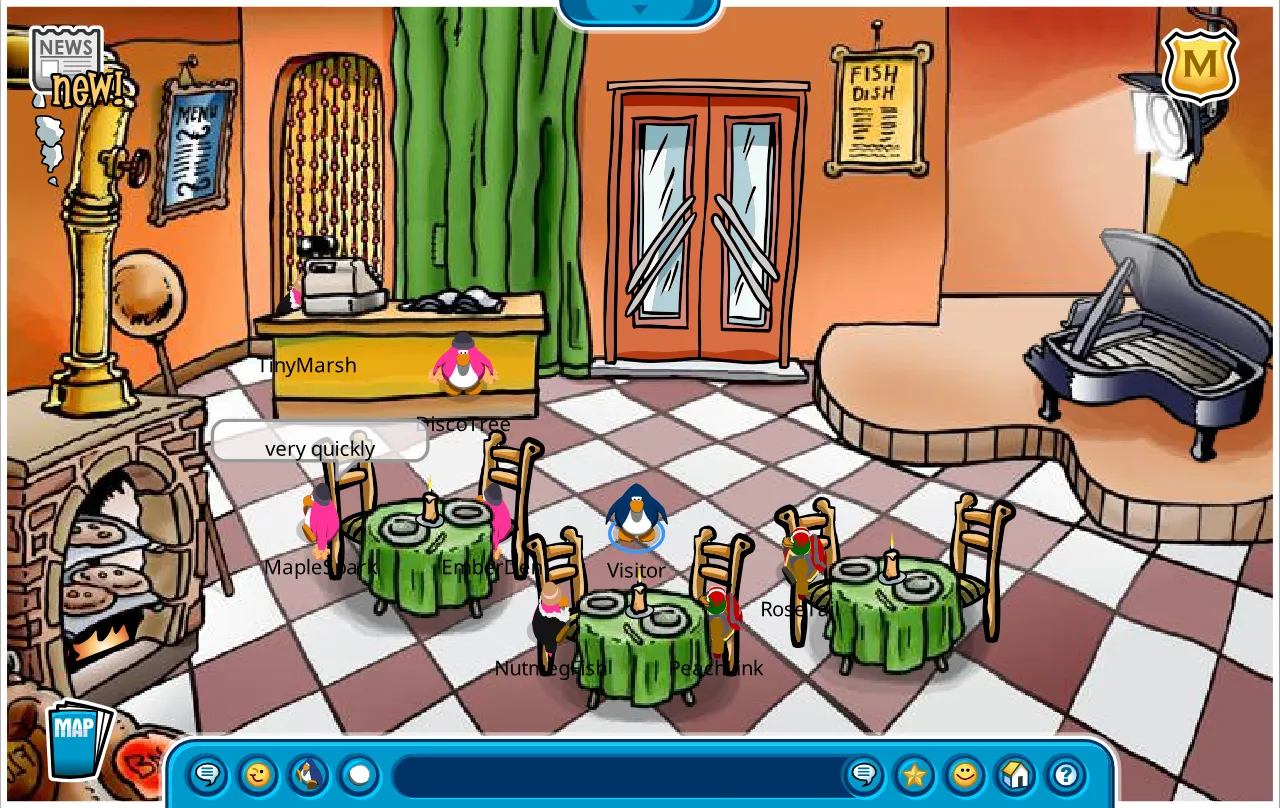
Pizza Parlor, November 2007: staff at the counter and customers seated at the real tables.
All shots come from a test copy of the server. The one test penguin is “Visitor”; every other penguin is a bot.
Era changes in Waddle Forever
The bots run inside a fork of Waddle Forever that I changed to play the 2005-2010 eras the way the real game did on
each date. Those changes are in waddle-forever/ (code only, no game files):
- Real files only, by date. Recreations and approximations are dropped from the 2005-2010 timeline. A file is not served before its first dated use, and later-year copies of party rooms are replaced by real copies from the same year.
- Music and maps. A silent room plays its own regular track for that date (or the default track). The real island maps are used instead of fan maps, with join aliases for the old Beach and Iceberg room ids.
- Safer joins. An unknown item id or a room that is not open yet on that date gets an error reply instead of crashing the handler.
- Puffles for the 2005-2008 clients. Adopt, name check, lists, feed, bath, rest, play, walk, and puffles drawn in the igloo so they can be clicked and walked. Puffle care also works for the 2008-2009 client.
- Igloos. Igloo entry works for the 2006-2008 clients, igloo edits are saved at once, and igloos of players who are offline load too.
- Shop rules on the server. “Already owned” and “not enough coins” are judged by the server, as in the original.
- Items in every era. An item owned in any era is owned in every era. Newer items show and can be worn with their
real art in the 2005-2008 clients (including the back half of capes and wings), through a small ActionScript layer
(
item-art.as, compiled intoitem-art-avm1.ts). - Minigames and events. Legacy minigame completion and coin rewards fixed, the 2007 Fair games connected to the
old rooms with ticket returns (see
waddle-forever/FAIR-GAMES.md), the Halloween candy hunts restored, and old game files held back until their release date. - LAN play. The address the clients use comes from the request (or
WF_TARGET_IP), the HTTP port fromWF_HTTP_PORT, and a local Ruffle build can be served fromWF_RUFFLE_DIR. - The bot hooks.
bots.tsplus small hooks inworld-server.ts,world.tsandjoin.tsthat let the bots fill a room before a player’s join reply.
Requirements
- Linux or WSL2 for the server (my server runs Ubuntu under WSL2). Windows may work for Waddle Forever itself, but the
bot adapter starts the brain with the
python3command, which must be on the PATH. - Node.js and Yarn, as Waddle Forever needs. I run Node 20.12.2.
- Python 3 for the bot brain, standard library only. Tested with Python 3.14.
- Waddle Forever’s game media, set up the way its own README describes. Some era changes expect extra real files
in
media/default/(archived party rooms, the 2007 Fair game files built bywaddle-forever/scripts/bots_fair_games.py, a few filled-in rooms). Those are Club Penguin files and are not in this repo. - A client that can play the old Flash files, such as Ruffle or the Waddle Forever client.
- Optional: a Houdini server, if you want the same bots there too.
Install
-
Get Waddle Forever at the commit the patches were made against, and apply the 24 patches:
git clone https://github.com/nhaar/Waddle-Forever
cd Waddle-Forever
git checkout -b bots-eras 7a578e7544e7bfd95ffb2a92033e02a86e262475
git am <path-to>/club-penguin-bots/waddle-forever/patches/*.patch
The files in
waddle-forever/src,scripts,flaandtsconfig.bots-check.jsonare the same changes as finished files, if you would rather read or copy them. -
Put the bot brain where the server looks for it.
bots.tssetsROOTnear the top (/opt/club-penguin/src/wand/houdinion my server) and loads the brain from<ROOT>/houdini/plugins/bots/:sudo mkdir -p /opt/club-penguin/src/wand/houdini/houdini/plugins sudo cp -r <path-to>/club-penguin-bots/bots/bots /opt/club-penguin/src/wand/houdini/houdini/plugins/Or change
ROOTinsrc/server/socket-server/bots.tsto a folder of your choice and copybotsinto<ROOT>/houdini/plugins/there. -
Install and build Waddle Forever as its README describes (
yarn install, then its build steps). -
Optional, Houdini: copy
bots/bots/into Houdini’shoudini/plugins/folder. It was made against Houdini commit45021fa838ede1e1526858ea079bd13d1b01d5b9and uses Houdini’s own dependencies.
Run
-
Start the Waddle Forever server. I run only the server part, from the Waddle Forever folder:
npx tsx src/server/main.ts(
yarn devdoes the same with file watching.) The log should showBots ready (four reserved room slots). -
Log in with a client and walk into a room. The bots appear as you arrive and start their scene within a few seconds.
-
Click a bot to see its player card, say hi, wave, or send it a buddy request.
To run without bots, take Bots out of src/server/socket-server/world-server.ts (the import, the
constructor and stop() calls, and the intercept check in front of the XT handler). Today the server stops at
startup if the brain files are missing.
Configuration
| Setting | Where | Meaning |
|---|---|---|
ROOT |
top of bots.ts |
folder that holds houdini/plugins/bots/ |
WF_BOTS_STATE |
environment | where the bots keep their state file (default <ROOT>/bots-state.json) |
WF_TARGET_IP |
environment | address the clients should use when it is not the request’s host |
WF_HTTP_PORT |
environment | HTTP port (default 24105); login and world ports follow it |
WF_RUFFLE_DIR |
environment | folder with a Ruffle web build to serve at /ruffle |
WF_ALLOW_FAN |
environment | 1 serves fan-made recreation files again |
Room sizes for the bots are in Brain.target() in brain.py (8 per room, 6 in the Coffee Shop). The state file
holds buddy lists and bot memories; keep it out of git.
How it works
- One brain, two servers.
brain.pydecides everything: who is in which room, where they walk, what they say. It has no network code.scenes.pyholds the room scenes and chat,lives.pythe traits, goals and the island’s room map,outfits.pythe dated wardrobe, andpersonality.jsonthe 400 bots, room keys and floor maps. - Waddle Forever side.
bots.tsstartsbrain.pyas a child process. Once a second it sends a JSON snapshot (rooms with players and positions, chat, waves, emotes, snowballs, buddy changes, and the era’s allowed items) and gets back a list of actions: spawn, remove, move, frame (sit or dance), say, wave, emote, snowball and puck. It turns them into the normal room packets every client already understands. When a player joins a room, the server asks the brain to fill it first, then sends the join reply. - Houdini side.
__init__.pyis a Houdini plugin that imports the same brain directly. Bots are room members without a network connection, so the same packets reach the players. It also makes Town the spawn room and frees a bot’s place before a full room could turn a player away. - Shared memory. Both sides use the same bot ids and the same state file, so buddies and memories carry over when the server is switched.
Tester
tester/ is a QA bot that plays old Club Penguin (2005-2008) the way a young kid would, to check that the server
really serves every event of that era on the right date: the map, rooms, music, minigames, hunt items, catalogues,
puffles, igloo and inventory. It runs on a separate sandbox copy of the server (ports 16112-16114), never the main
one, and writes down what passed and what failed. Most of the era fixes above were found this way.
- Layer A,
kidbot.py(protocol). One penguin talks to the server the way that era’s client does (packet shapes taken from the era’s own client files). Per event: set the sandbox date, ask the server what it serves that day (oracle.ts), then walk the map and every room, check the music, play every open minigame to the end and see the coins land, collect the hunt items, buy from the catalogues, adopt a puffle, edit the igloo, check the inventory and player card, and check that everything from earlier events is still there. Results go toresults.tsvand the event’s row inCP-EVENTS-2005-2008.md(79 events). - Layer B,
layerb.mjs(the real client, mouse clicks only). The real era client in Ruffle, in a headless, muted Chromium (Playwright), driven only by clicks. Click spots come from the game’s own files (swfscan.pyreads every placed button and trigger) and are mapped to the screen by asking the running client (patchwf.py --probe, read-only). A click only counts once the packet or change it should cause is actually seen.inv.mjsandpuffle.mjsare two focused flows: the inventory across eras, and adopt a puffle, walk it, log out and back in.
| File | What |
|---|---|
kidbot.py |
layer A |
layerb.mjs, inv.mjs, puffle.mjs |
layer B and its two focused flows |
layerb.sh, inv.sh, puffle.sh, layerb-chain.sh |
runners (one browser at a time, in a systemd unit capped at 6 GB) |
sandbox-ctl.sh |
the sandbox server: setup, date YYYY-MM-DD, start, stop, status, log |
oracle.ts |
asks Waddle Forever what it serves on a date (copied into the sandbox and run with tsx) |
patchwf.py, wf_autologin.py |
straight-in login for the era clients (no typing) plus the read-only probe |
swfscan.py |
reads old Flash (AS1/AS2) files: disassembler and placed objects, no external tools |
as2/ |
compiles a small AS2 file for the probe (uses JPEXS FFDec) |
CP-EVENTS-2005-2008.md |
the 79 events, their dates and free items, and the 12 checks (status columns empty) |
Requirements: Linux or WSL2 with systemd, Python 3 and Node.js; a Waddle Forever checkout with these patches and
its node_modules at /opt/club-penguin/wf/src (the scripts use the /opt/club-penguin/ layout; change the paths at
the top of each script for another layout). For layer B, Playwright 1.63 with Chromium in
/opt/club-penguin/kidbot-browser (npm i playwright, then npx playwright install chromium) and a Ruffle web build.
For as2/ only, Java and JPEXS FFDec.
bash tester/sandbox-ctl.sh setup      # git worktree of the server + copied data; set the branch name in that line to yours
python3 tester/kidbot.py 1-79          # layer A, all events (or one: 49)
bash tester/layerb.sh 49               # layer B, one event (1-79 for all); --only hunt,puffle; --all re-walks proven rooms
Logs and screenshots go to $KB_OUT (default /var/tmp/cp-kidbot). Status: layer A runs all 79 events and they all
pass on my server (934 checks pass, 0 fail, 14 not applicable); layer B has so far been run on a few events plus the
inventory and puffle flows. It was written against this fork, so on stock Waddle Forever expect some checks to need
changes. Hobby code, not a polished tool.
Project layout
| Folder | What lives there |
|---|---|
bots/bots/ |
the bot brain (brain.py, scenes.py, lives.py, outfits.py), its data (personality.json, wardrobe.json, houdini-wardrobe.json) and the Houdini plugin (__init__.py) |
bots/test_scenes.py, bots/test_outfits.py |
unit tests for the brain |
waddle-forever/patches/ |
the Waddle Forever changes as 24 patches (code only) |
waddle-forever/src/, scripts/, fla/ |
the same changes as finished files, at Waddle Forever’s own paths |
tester/ |
the kid tester bot |
docs/screenshots/ |
README pictures |
Development
python bots/test_scenes.py      # 29 tests: admission, room budget, roles, chat, lives
python bots/test_outfits.py     # 6 tests: names, dated outfits, slots
Both run with plain Python, no server needed. In a patched Waddle Forever folder, npx tsc -p tsconfig.bots-check.json type-checks the server with the bot code. After changing item-art.as, rebuild
item-art-avm1.ts with the tools in tester/as2/.
Coming soon
Keep this list current: when an item ships, move it to Recent changes with the date, then add what is next.
- Make the bots optional and their folder a setting, so the server starts without the brain files.
- Run the tester’s real-client layer through all 79 events, not just a few.
- Teach the tester sled races and table games (they need two clients at once).
- Real-client checks for the late-2008 client (events 68-79).
- Prove the Halloween 2007 candy hunt end to end in the real client (8 of 8 candies and the scarf).
- Add more dated items to the bot wardrobe where the release date can be proven.
Recent changes
- 2026-10-28 Clearer names: the bot folder is
bots/bots/, the server class isBotsinbots.ts, the state file isbots-state.jsonand the scripts arescripts/bots_*_games.py. Bot outfits re-roll once (new outfit seed). - 2026-10-04 One public repo for the bots, the Waddle Forever changes and the tester; README with screenshots.
- 2026-09-24 Newer items show with their real art and can be worn in the 2005-2008 clients, back halves of capes and wings included.
- 2026-09-23 One inventory for every era (owned in any era means owned in every era); old-era puffles are drawn in the igloo, clickable and walkable.
- 2026-09-22 Tester: protocol layer walks all 79 events of 2005-2008 and the real-client layer is added; fixes for old-era puffles, igloo entry, shop rules and the Halloween 2007 puffle card.
- 2026-09-20 Bots get lives: favourite rooms, friend groups, goals, regulars who remember players, and reactions to waves, emotes and snowballs.
- 2026-09-19 400 distinct bot names and coordinated outfits from a dated wardrobe; seated cafe and pizza scenes.
- 2026-09-19 First bots on both servers, plus the 2005-2010 era changes: real files only, music in every room, Fair games, igloo saves, minigame fixes and Halloween hunts.
Related repositories
Credits and license
- Waddle Forever by nhaar and contributors, MIT License. The changes in
waddle-forever/keep that license; see waddle-forever/LICENSE. As upstream says, it does not cover third-party code and assets inmedia/. - Houdini by Solero, MIT License, copied in bots/HOUDINI-LICENSE.md. The Houdini plugin here is new code written for it.
- Ruffle plays the Flash client, Playwright drives the tester’s browser, and JPEXS FFDec compiles the tester’s probe. None of them are included.
- The bots, their data and the tester were written by DaffyDabz and are released under the
MIT License (the files in
waddle-forever/keep Waddle Forever’s own MIT license). - Club Penguin was made by New Horizon Interactive and Disney. This is a fan project for a private server. No game files (SWF, art, music) are included. Item ids, names and dates in the wardrobe, and the event names, dates and free items in the tester’s list, are facts taken from fan wiki archives.